
• Blog
  • Services
    • PHIshMD Ongoing Training
    • HIPAA Compliance
    • Discover Vulnerabilities to Patient PHI
  • Store
    • HIPAA Secure Now Service Store
  • Contact Us
    • Sales Inquiry
    • Customer Support
  • Resources
    • Free Healthcare Security Check Up Quiz
    • HIPAA Compliance Requirements | A Guide
    • Webinars & Downloadable Content
    • Use our free Breach Cost Calculator
    • HIPAA Secured Seal
    • In-Email Training & Analysis | Catch Phish

Call us at: 877-275-4545

Client or Partner? Login here
Health Secure Now!Health Secure Now!
  • Blog
  • Services
    • PHIshMD Ongoing Training
    • HIPAA Compliance
    • Discover Vulnerabilities to Patient PHI
  • Store
    • HIPAA Secure Now Service Store
  • Contact Us
    • Sales Inquiry
    • Customer Support
  • Resources
    • Free Healthcare Security Check Up Quiz
    • HIPAA Compliance Requirements | A Guide
    • Webinars & Downloadable Content
    • Use our free Breach Cost Calculator
    • HIPAA Secured Seal
    • In-Email Training & Analysis | Catch Phish

Step by step approach to HIPAA security

March 9, 2014 Posted by Art Gross HIPAA, Policies and Procedures, Risk Assessment, Security Training No Comments

Step-by-step

When it comes to complying with the HIPAA Security and Omnibus Rules, there is a lot of confusion as to what needs to be done. And if you look at the amount of work it can be overwhelming; security risk assessment, employee training, policies and procedures, business associates, breach notification, encryption, disaster recovery to name just a few of what needs to be in place.

We have prospective clients that come to us and say:

I need encrypt my laptop to comply with HIPAA

I always smile when I hear that. While there is no argument that encrypting laptops, smartphones, and USB drives will help protect patient information, encryption should be implemented in the context of a total strategy to protect patient information.

Step by Step Process

We always make it clear that to comply with HIPAA regulations and to protect patient information it is important to follow a structured process. This is the process that we recommend:

Perform a security risk assessment (SRA)

Where is patient information?
A SRA will help an organization understand where patient information is. It is not only in your EHR but could be in documents, spreadsheets, billing systems, email, smartphones, USB drives, diagnostic equipment, digital x-rays, transcription systems, backup devices, stored on business associate’s systems, etc.

How is patient information being protected?
A SRA will look at how these systems are currently being protected. What policies and procedures are in place? What security has been implemented? What redundancy and controls to ensure that patient information remains accessible? What process or mechanisms are in place to prevent or detect unauthorized access to patient information?

Analyze threats to patient information
A SRA will look at threats that could put patient information in jeopardy such as a lost laptop, fire or flood, hacker accessing your systems, employees stealing data to name a few.

Recommend additional security
A SRA will recommend additional security to further protect patient information. Security may be policies, procedures, training, network security, system redundancy, encryption, etc.

Implement policies and procedures

The next step after a SRA is to implement the appropriate security policies and procedures. Some of the policies and procedures might include a workstation use policy which informs employees what they should or shouldn’t do with patient information; such as not posting patient information on Facebook or social media. Policies might include reviewing system activity to ensure that access to patient information is appropriate. Procedures might include data backup to ensure patient information is protected or a termination procedure to ensure that terminated employees do not access patient information. Other policies might include a breach notification policy and procedure that an organization will follow in the event of a data breach or a policy that ensures business associates are properly protecting patient information.

Training

Employees should be trained on the organization’s policies and procedures. They should understand the risks to patient information and how they should protect patient information. They should understand what is expected of them. They should know that they could be sanctioned (up to losing their job) if they violate an organization’s policies.

Technology

The SRA will identify additional security which might include additional network or data security. This is where encryption should be evaluated. Other technology that might be evaluated is a disaster recovery plan that will enable access to patient information in the event of a disaster (fire, flood, hurricane, tornado, etc.). The SRA will help guide an organization to what additional technology should be evaluated.

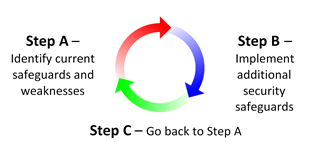
Go back to the beginning and start again

A key point is realizing that once you do each of these steps you are still not done. HIPAA is an ongoing process. The process is called a risk management process. That means that an organization should be doing periodic SRAs, implementing additional policies and procedures, implementing additional patient information security and technology. And continuously training their employees on how they should be protecting patient information.

There is no hard and fast rule that the steps need to be in the order defined above. Can an organization implement encryption before they train their employees? Absolutely! The steps defined above are a general guideline. With that said, it is highly recommended to start with the SRA. That will help guide the organization and show them where they need to focus on. HIPAA can be overwhelming but if an organization takes the step by step approach to complying with the regulations and to protecting patient information it can be a much simpler process.

[framed_box bgColor=”#ffd390″]

HIPAA audits are coming
are you ready?

(Click on the links below for more information)

Covered Entities

    • Have you performed a Security Risk Assessment?
    • Do you have written policies and procedures on how to protect patient information?
    • Do you have an incident response plan?
    • Do you have updated Business Associate Agreements?
    • Have you provided HIPAA security training for all employees?

Business Associates

    • Are you a Business Associate?
    • Have you performed a Security Risk Assessment?
    • Do you have written policies and procedures on how to protect patient information?
    • Do you have an incident response plan?
    • Do you have Business Associate Agreements with your subcontractors?
    • Have you provided HIPAA security training for all employees?

Now is the time to get ready for the
HIPAA permanent audit program!

Contact us if you have questions, concerns or need help with HIPAA compliance


[/framed_box]
Tags: BreachBusiness AssociateDisaster RecoveryHIPAAPolicies and ProceduresRisk AssessmentSecurity Training
No Comments
Share
0

You also might be interested in

Introducing HIPAA Secure Now!

Feb 13, 2011

We are proud to announce the launch of the HIPAA[...]

Why perform a Risk Assessment?

Feb 15, 2011

A Risk Assessment is required in order to comply with[...]

Employee training might produce the best security ROI

Employee training might produce the best security ROI

Feb 21, 2011

There are countless security products on the market today. You[...]

Leave a Reply Cancel Reply

Recent Posts

  • Annual Business Checkup
  • The Future of Healthcare Cybersecurity: Trends to Watch
  • How to Handle a Breach
  • A Dynamic Duo: Cybersecurity and Compliance
  • Elements of a Comprehensive HIPAA Annual Training

Recent Comments

  • Art on Maintaining HIPAA-Compliant Communication Amongst Colleagues
  • Michell Holmes on Maintaining HIPAA-Compliant Communication Amongst Colleagues
  • campusmedicine important source on You Can Leave a Message – But Make Sure It Is HIPAA Compliant
  • Milan on PHI or PII – What’s the Difference?
  • Automatic Backlinks on Free HIPAA Security Training!

Archives

  • December 2023
  • October 2023
  • September 2023
  • August 2023
  • July 2023
  • June 2023
  • May 2023
  • April 2023
  • March 2023
  • February 2023
  • January 2023
  • December 2022
  • November 2022
  • October 2022
  • September 2022
  • August 2022
  • July 2022
  • June 2022
  • May 2022
  • April 2022
  • March 2022
  • February 2022
  • January 2022
  • December 2021
  • November 2021
  • October 2021
  • September 2021
  • August 2021
  • July 2021
  • June 2021
  • May 2021
  • April 2021
  • March 2021
  • February 2021
  • January 2021
  • December 2020
  • November 2020
  • October 2020
  • September 2020
  • August 2020
  • July 2020
  • June 2020
  • May 2020
  • April 2020
  • March 2020
  • February 2020
  • January 2020
  • December 2019
  • November 2019
  • October 2019
  • September 2019
  • August 2019
  • July 2019
  • June 2019
  • May 2019
  • April 2019
  • March 2019
  • February 2019
  • January 2019
  • November 2018
  • October 2018
  • September 2018
  • August 2018
  • July 2018
  • June 2018
  • May 2018
  • April 2018
  • March 2018
  • February 2018
  • January 2018
  • December 2017
  • November 2017
  • October 2017
  • September 2017
  • August 2017
  • July 2017
  • June 2017
  • May 2017
  • April 2017
  • March 2017
  • February 2017
  • January 2017
  • December 2016
  • November 2016
  • October 2016
  • September 2016
  • August 2016
  • July 2016
  • June 2016
  • May 2016
  • April 2016
  • March 2016
  • February 2016
  • January 2016
  • December 2015
  • November 2015
  • October 2015
  • September 2015
  • August 2015
  • June 2015
  • May 2015
  • April 2015
  • March 2015
  • February 2015
  • January 2015
  • December 2014
  • November 2014
  • October 2014
  • September 2014
  • August 2014
  • July 2014
  • June 2014
  • May 2014
  • April 2014
  • March 2014
  • February 2014
  • January 2014
  • December 2013
  • November 2013
  • October 2013
  • September 2013
  • August 2013
  • July 2013
  • June 2013
  • May 2013
  • April 2013
  • March 2013
  • February 2013
  • January 2013
  • December 2012
  • November 2012
  • October 2012
  • September 2012
  • July 2012
  • June 2012
  • May 2012
  • April 2012
  • March 2012
  • February 2012
  • January 2012
  • December 2011
  • November 2011
  • October 2011
  • September 2011
  • August 2011
  • July 2011
  • June 2011
  • May 2011
  • April 2011
  • March 2011
  • February 2011

Categories

  • Backup & Disaster Recovery
  • Business Associates
  • Client News
  • Download
  • Healthcare Industry
  • HIPAA
  • HIPAA Audits
  • HIPAA Violations
  • HSN News
  • Legal
  • MACRA
  • Policies and Procedures
  • Press Release
  • Remote Workforce
  • Risk Assessment
  • Scams
  • Security
  • Security Reminders
  • Security Training
  • Telehealth
  • Uncategorized
  • Webinar
  • Website

Meta

  • Log in
  • Entries feed
  • Comments feed
  • WordPress.org

Contact Us

  • HIPAA Secure Now
  • 55 Madison Ave, Suite 400 Morristown, NJ 07960
  • (877) 275 - 4545
  • info@hipaasecurenow.com

Find us on Social Media

LEGAL

Privacy Policy

Terms of Service

Subscribe to our Newsletter

  • Hidden

© 2026 · HIPAA Secure Now!

Prev Next